UniPlans Corpus
UK University Strategic Plans (2020-2040)
Corpus Overview
The UniPlans corpus contains strategic planning documents from 99 UK universities, providing a window into how higher education institutions articulate their visions, goals, and strategies for the future.
Key Statistics
| Metric | Value |
|---|---|
| Documents | 99 |
| Total Words | ~334,000 |
| Time Period | 2020-2040 strategies |
| Language | English (British) |
Geographic Distribution
| Country | Universities |
|---|---|
| England | ~82 |
| Scotland | ~14 |
| Wales | ~3 |
Available Metadata
Each document includes the following metadata for filtering and analysis:
- university_name: Full name of the institution
- country: England, Scotland, or Wales
- city: Location of the main campus
- strategy_year: Target year of the strategic plan (e.g., 2030)
Corpus Processing
Data Source
- 99 UK university strategic plan PDFs
- Time period: 2020-2040 strategies
- Collected from institutional websites
NLP Processing
Processed with spaCy en_core_web_lg large model:
- Tokenization and sentence segmentation
- Part-of-speech tagging (Penn Treebank)
- Lemmatization
- Dependency parsing (Universal Dependencies)
- Named entity recognition
- Morphological feature extraction
Compilation
Converted to NoSketch Engine vertical format:
- One token per line with tab-separated attributes
- Document structure marked with XML tags
- Indexed with Manatee corpus compiler
Getting Started with NoSketch Engine
NoSketch Engine (NoSkE) provides a powerful interface for querying linguistic corpora using CQL.
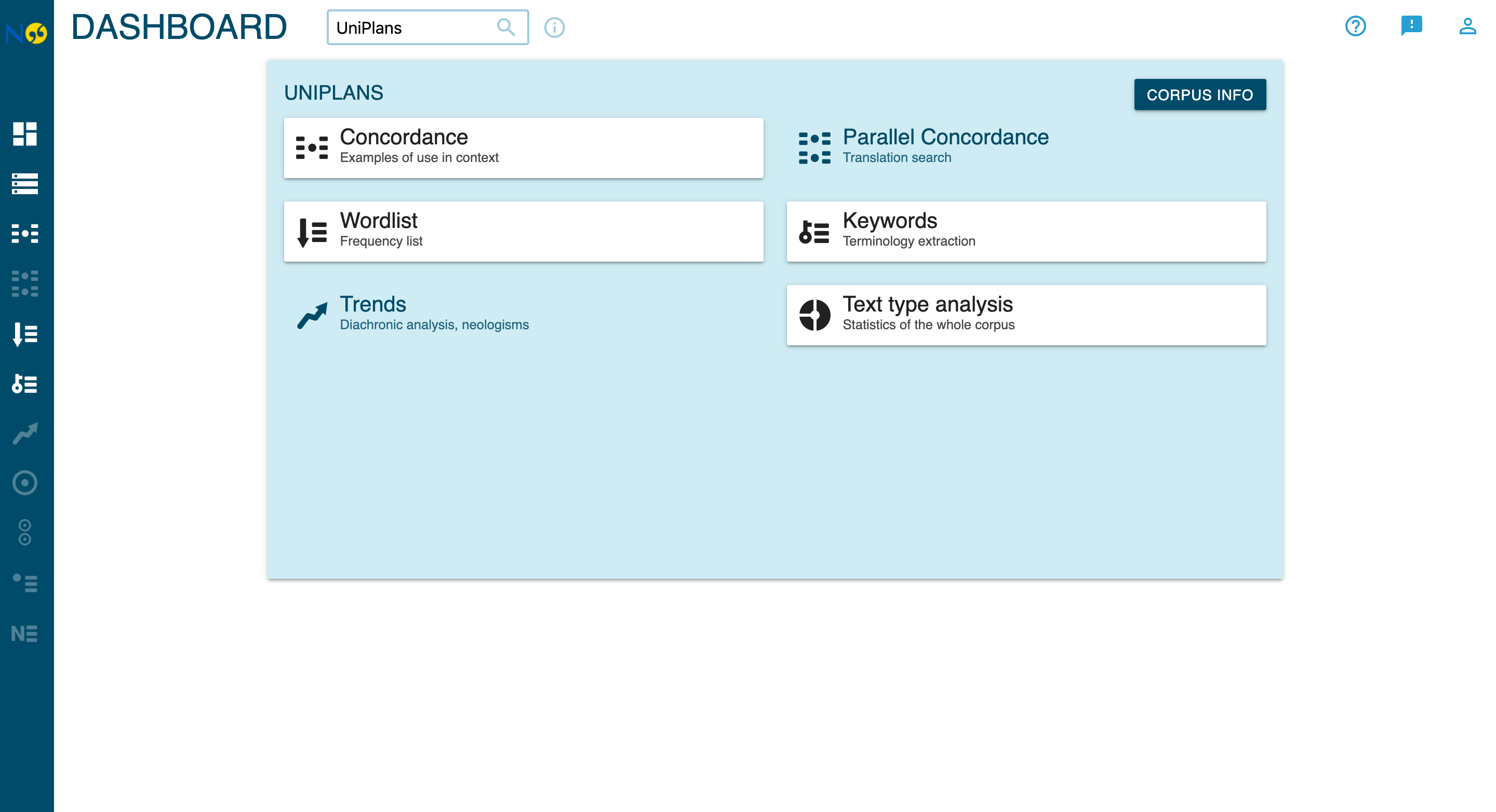
Accessing the Corpus
- Open NoSketch Engine at your local or production URL
- From the Dashboard, click Concordance to begin querying
- Select UniPlans from the corpus list
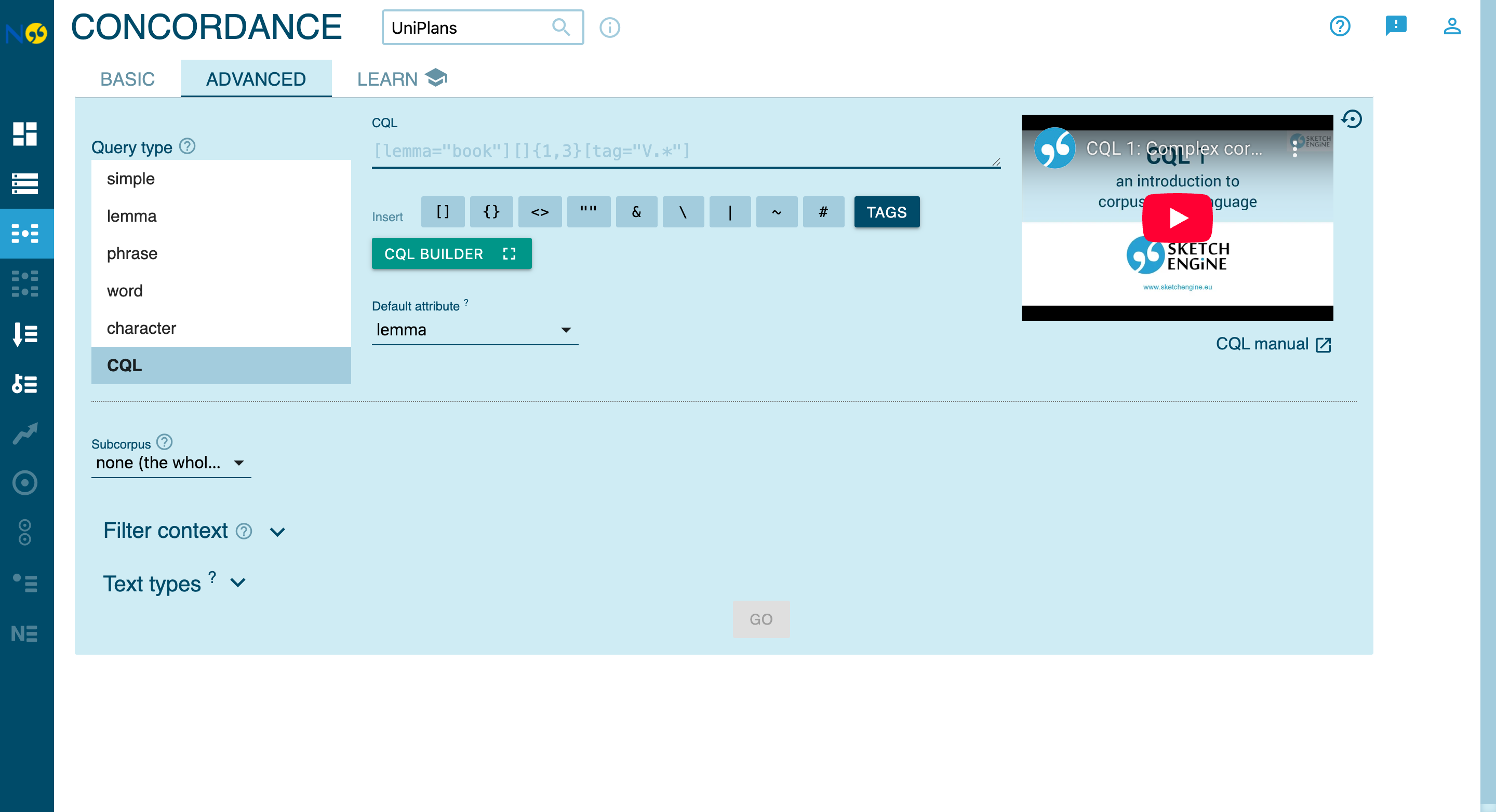
The CQL Query Interface
In the Concordance view, switch to the Advanced tab and select CQL as the query type:
Using the Visual CQL Builder
For an interactive query-building experience, click the CQL Builder button to open the visual interface:
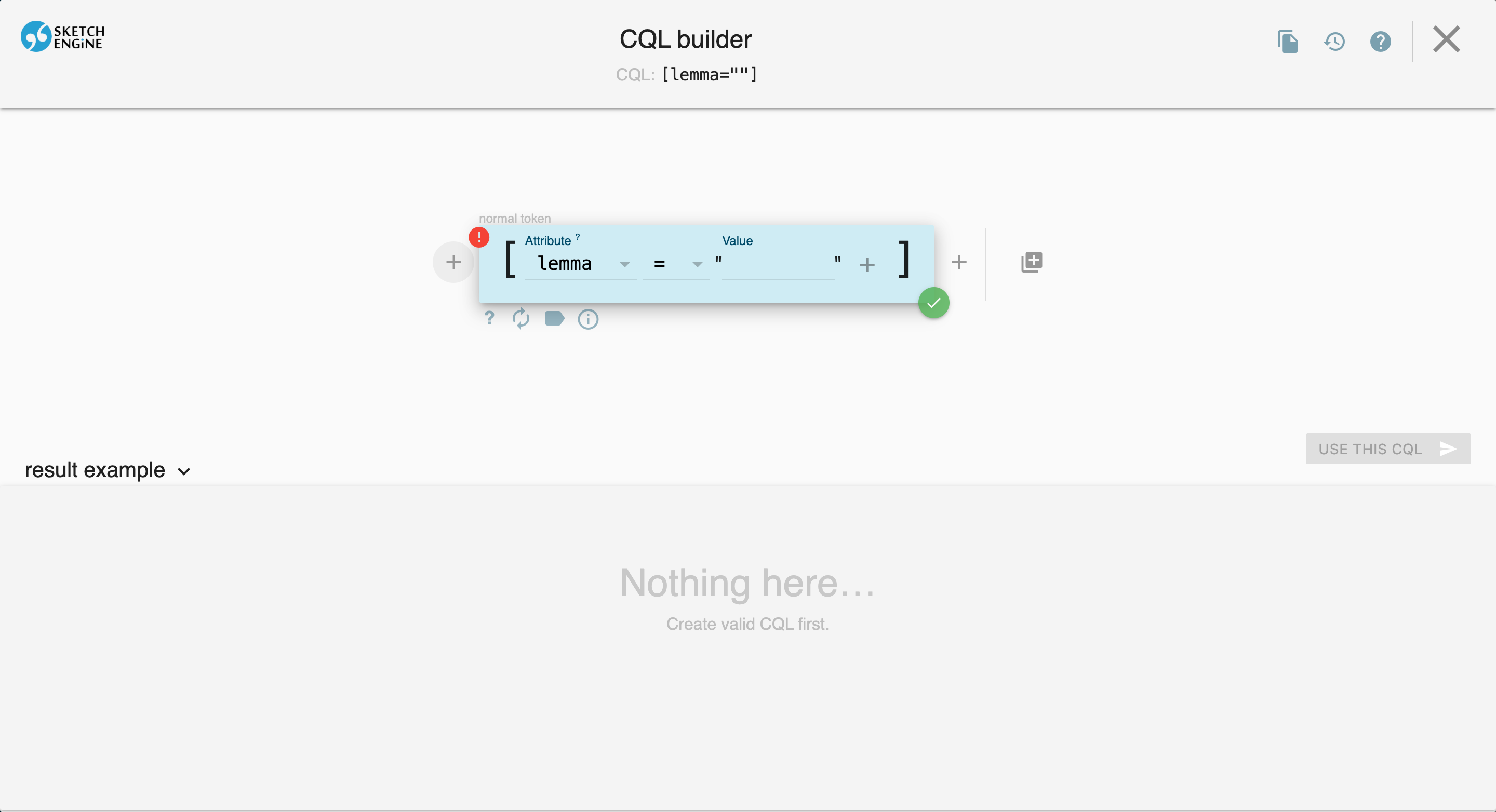
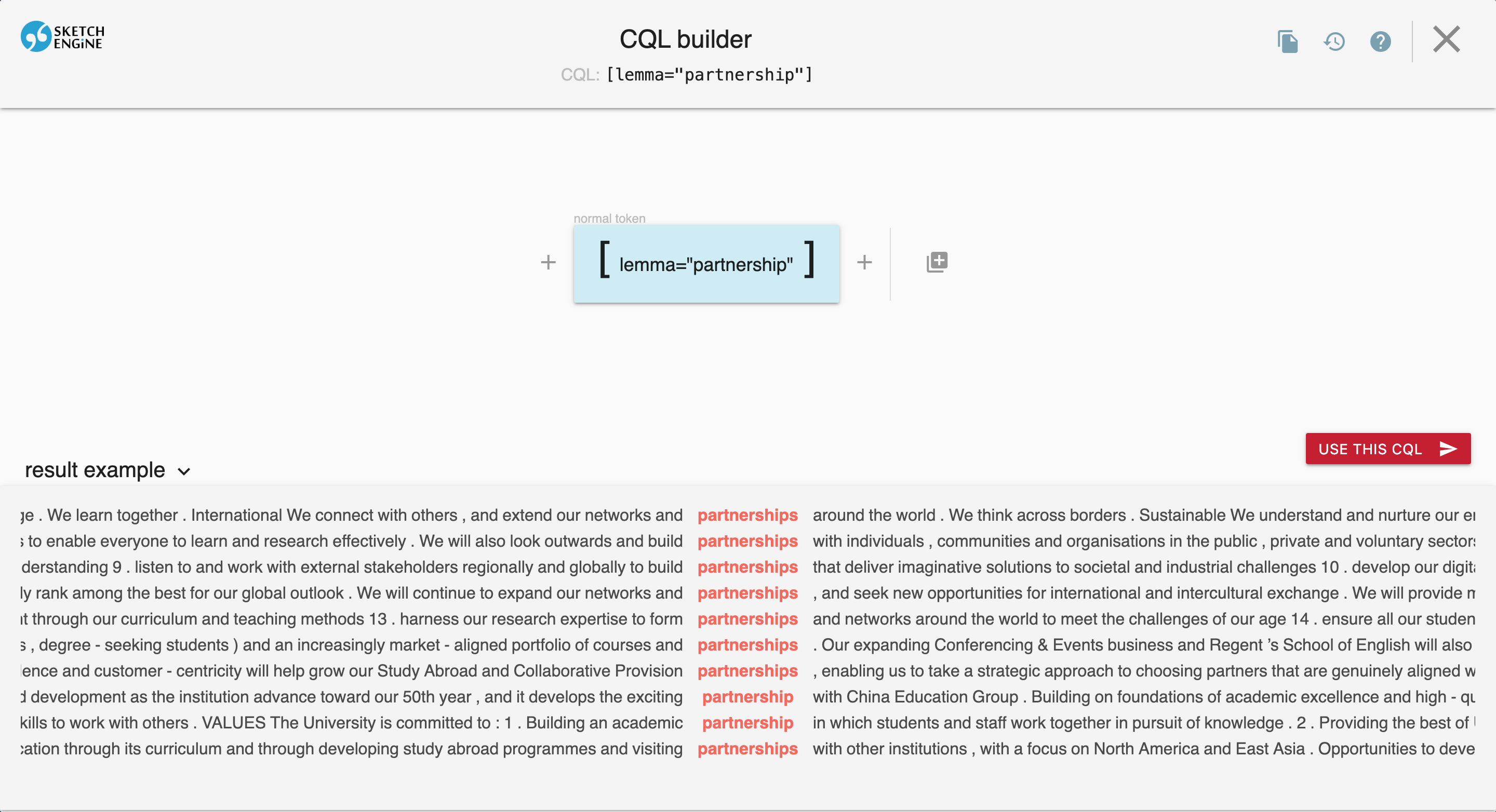
The CQL Builder allows you to:
- Add tokens with the + button
- Configure attributes (lemma, word, tag, etc.)
- Preview results as you build your query
- See the generated CQL at the top of the screen
CQL Query Basics
Corpus Query Language (CQL) is a powerful query language for searching linguistic corpora. Each query searches for tokens (words) matching specified attributes. See the Sketch Engine CQL documentation for comprehensive reference.
Basic Query Structure
[attribute="value"]Available Attributes
| Attribute | Description | Example | Finds |
|---|---|---|---|
word |
Exact word form | [word="partnerships"] | partnerships only |
lemma |
Base form (lemma) | [lemma="partnership"] | partnership, partnerships, Partnership |
pos |
Part-of-speech tag | [pos="NN"] | All singular nouns |
deprel |
Dependency relation | [deprel="nsubj"] | Words that are grammatical subjects |
head |
Head word (lemma) | [head="car"] | Words governed by car like blue in blue car |
ent_type |
Named entity type | [ent_type="ORG"] | University of Edinburgh, NHS, REF |
morph |
Morphological features | [morph="Number=Plur"] | Plural nouns and verbs |
Case Study: Analyzing partnership
The term partnership is central to university strategic discourse. Let’s explore how to analyze its usage.
Basic Word Search
Search for an exact word form:
This finds only partnership (singular, lowercase). To find all case variants:
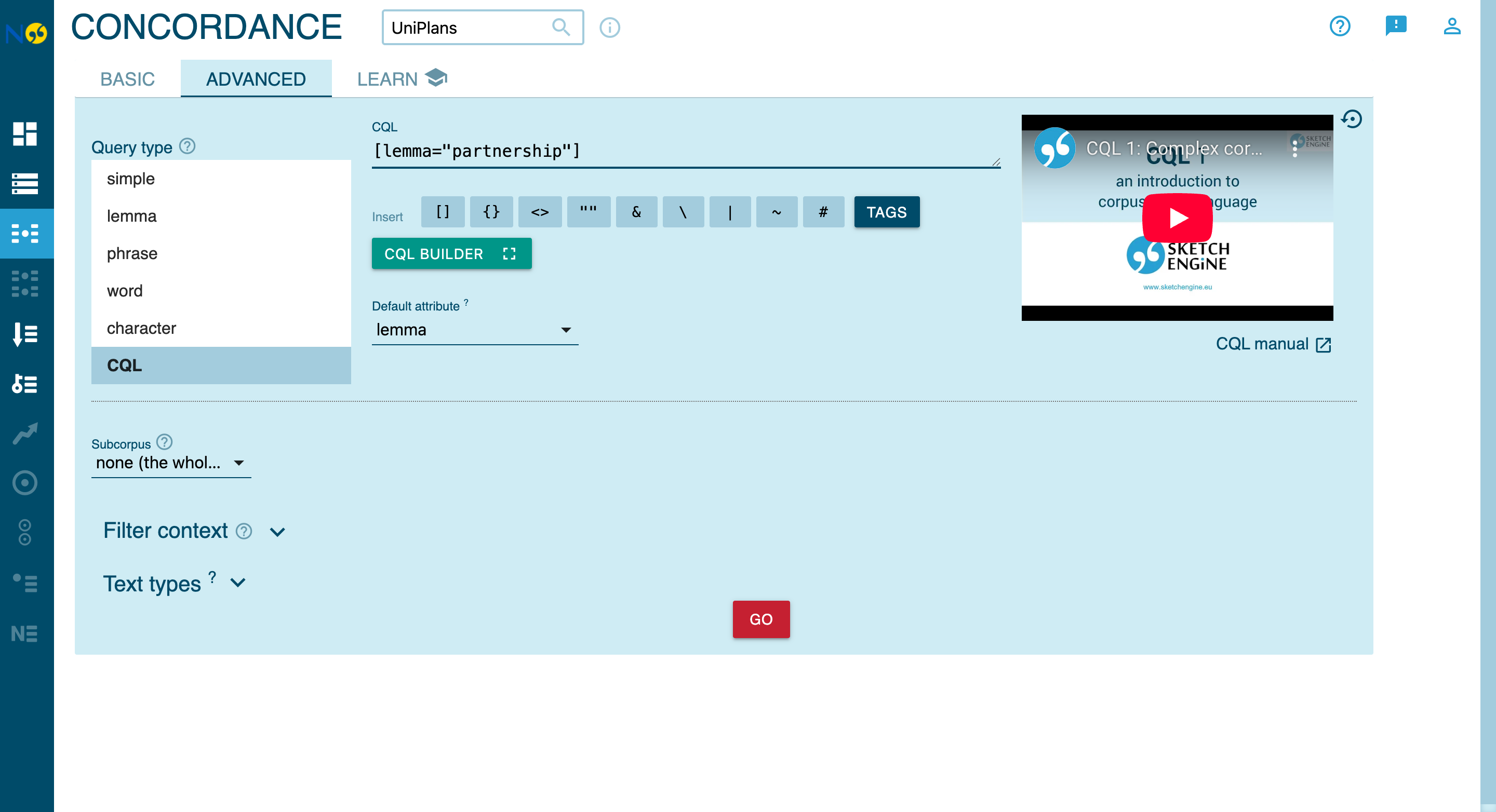
Lemma Search (All Forms)
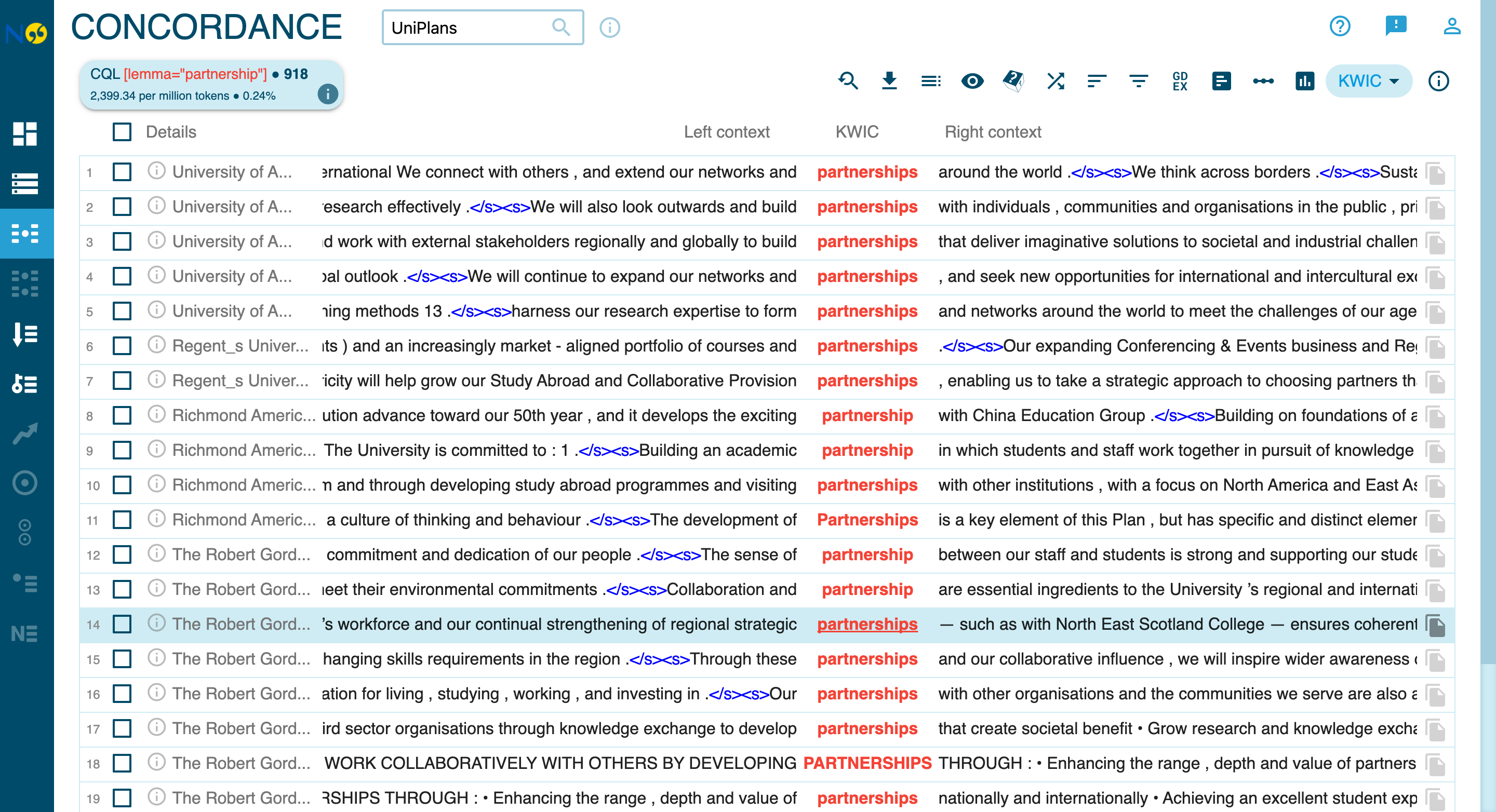
To find all forms of a word (partnership, partnerships, Partnership, etc.), use lemma search:
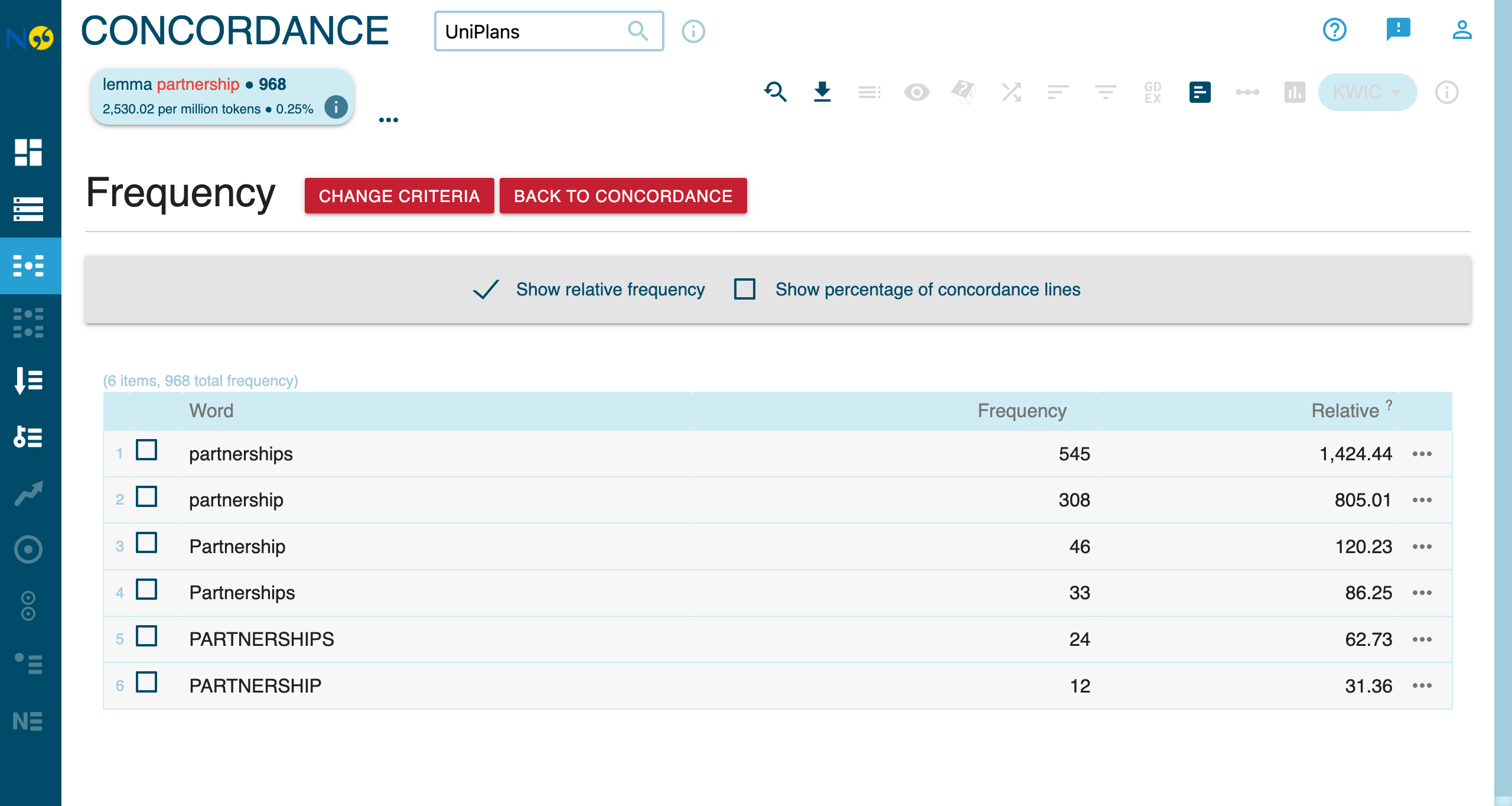
This returns ~968 hits across the corpus, capturing:
- partnership (singular)
- partnerships (plural)
- Partnership (capitalized)
- PARTNERSHIPS (uppercase)
Combining Attributes
Narrow your search by combining attributes with &:
This finds only plural forms of partnership.
This finds only singular forms.
The pos attribute uses Penn Treebank tags:
NN= singular nounNNS= plural nounNNP= proper noun (singular)JJ= adjectiveVB.*= verb forms (VB, VBD, VBG, VBN, VBP, VBZ)
Finding Collocations with Proximity
Search for words appearing together:
Adjacent words:
Finds: strategic partnership, strategic partnerships
Within N words:
Finds international partnership with 0-2 words in between.
Using Wildcards and Regex
Match patterns with regular expressions:
Finds: partner, partners, partnership, partnerships, partnering
Finds: strategy, strategic, strategies, strategically
Enable the Regex checkbox in the query builder to use pattern matching.
Syntactic Queries (Dependency Relations)
The corpus includes dependency parsing annotations, allowing you to search by grammatical relationships. See the Universal Dependencies relation inventory for the full list.
| Attribute | Description | Example | Finds |
|---|---|---|---|
word |
Exact word form | [word="partnerships"] | partnerships only |
lemma |
Base form (lemma) | [lemma="partnership"] | partnership, partnerships, Partnership |
pos |
Part-of-speech tag | [pos="NN"] | All singular nouns |
deprel |
Dependency relation | [deprel="nsubj"] | Words that are grammatical subjects |
head |
Head word (lemma) | [head="car"] | Words governed by car like blue in blue car |
ent_type |
Named entity type | [ent_type="ORG"] | University of Edinburgh, NHS, REF |
morph |
Morphological features | [morph="Number=Plur"] | Plural nouns and verbs |
Available Syntactic Attributes
| Attribute | Description | Example Values |
|---|---|---|
deprel |
Dependency relation | nsubj, dobj, pobj, amod |
head |
Head word (lemma) | develop, build, create |
head_n |
Head position | Token position number |
Grammatical Role Distribution
The distribution of partnership across grammatical roles reveals how universities frame partnerships in their strategic discourse. Use the Frequency feature with the deprel attribute to see this distribution.
Partnership as Grammatical Object
Find partnership when it’s the object of a verb:
This finds sentences like: “We will develop partnerships…”
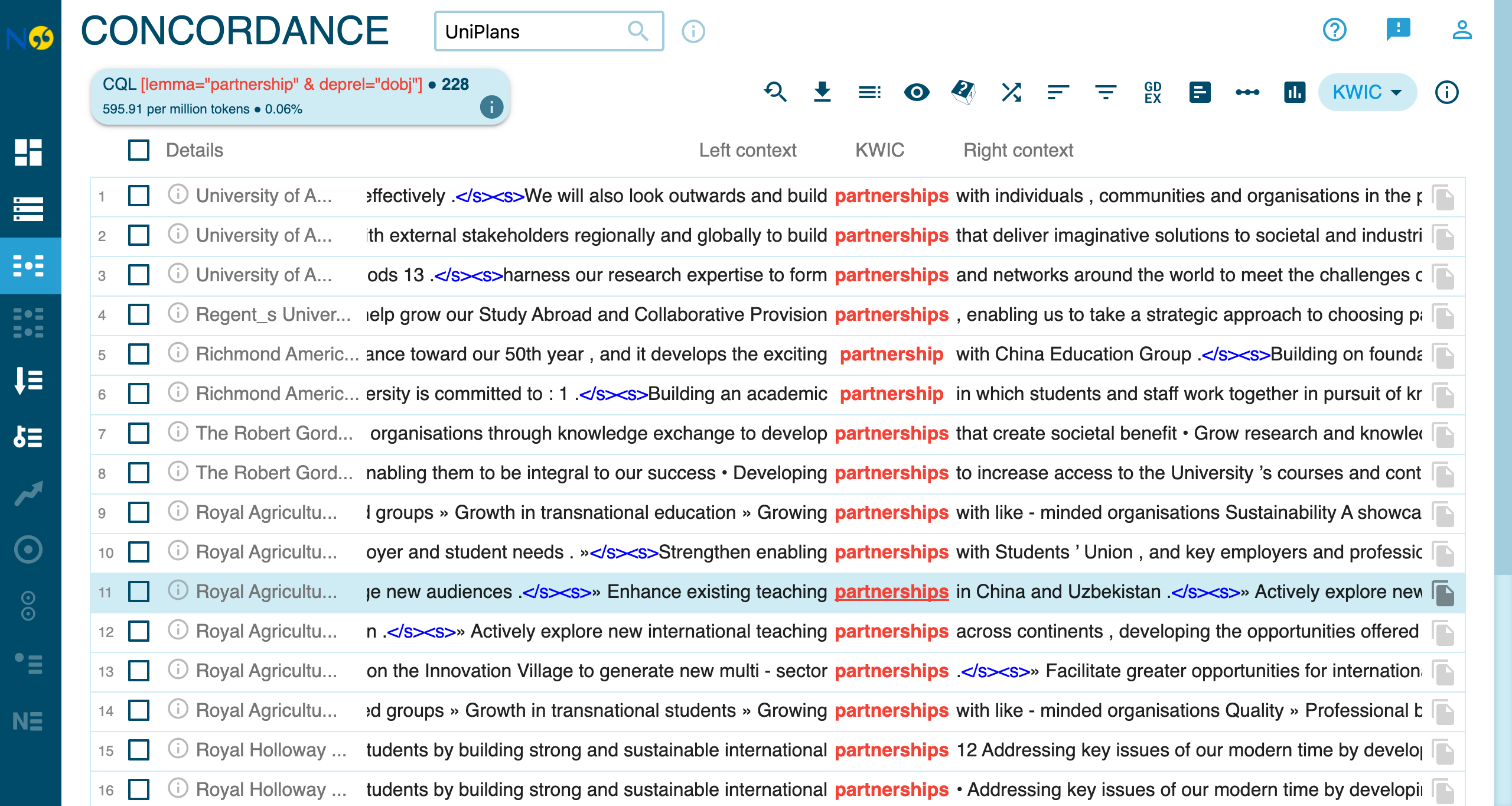
The concordance reveals the action verbs universities use with partnerships: build (34), develop (45), grow, strengthen (13), enhance (9), form, explore. This framing positions partnerships as goals to be achieved through institutional agency, reflecting a proactive, strategic orientation toward external relationships.
Finds: …through partnerships, …in partnership with…
The high frequency of prepositional object usage (38.8%) reflects the prevalence of phrases like in partnership with, through partnerships, and working in partnership in strategic planning discourse.
Partnership as Subject
Finds sentences where partnership is the subject: Partnerships enable us to…
Compound Modifiers
Find what modifies partnership:
This finds compound nouns like industry partnership, research partnership.
Morphological Queries
The corpus includes rich morphological annotations in Universal Dependencies format.
The morph Attribute
Morphological features are stored as feature-value pairs (e.g., Number=Plur).
Number (Singular vs Plural)
Query singular vs plural forms separately:
Finds all plural forms: partnerships, Partnerships
Finds all singular forms: partnership, Partnership
Use the Frequency feature to see the distribution of forms.
Run these queries and compare frequency counts to see whether universities prefer singular or plural forms.
Verb Tense
Find past tense verbs:
Find present tense:
Adjective Degree
Find comparative adjectives:
Finds: stronger, better, greater
Find superlative adjectives:
Finds: strongest, best, greatest
Use .* for regex matching within the morph attribute, as features may contain multiple values separated by |.
Comparative Adjectives in Strategic Discourse
Running the comparative adjective query reveals the evaluative register of strategic planning language:
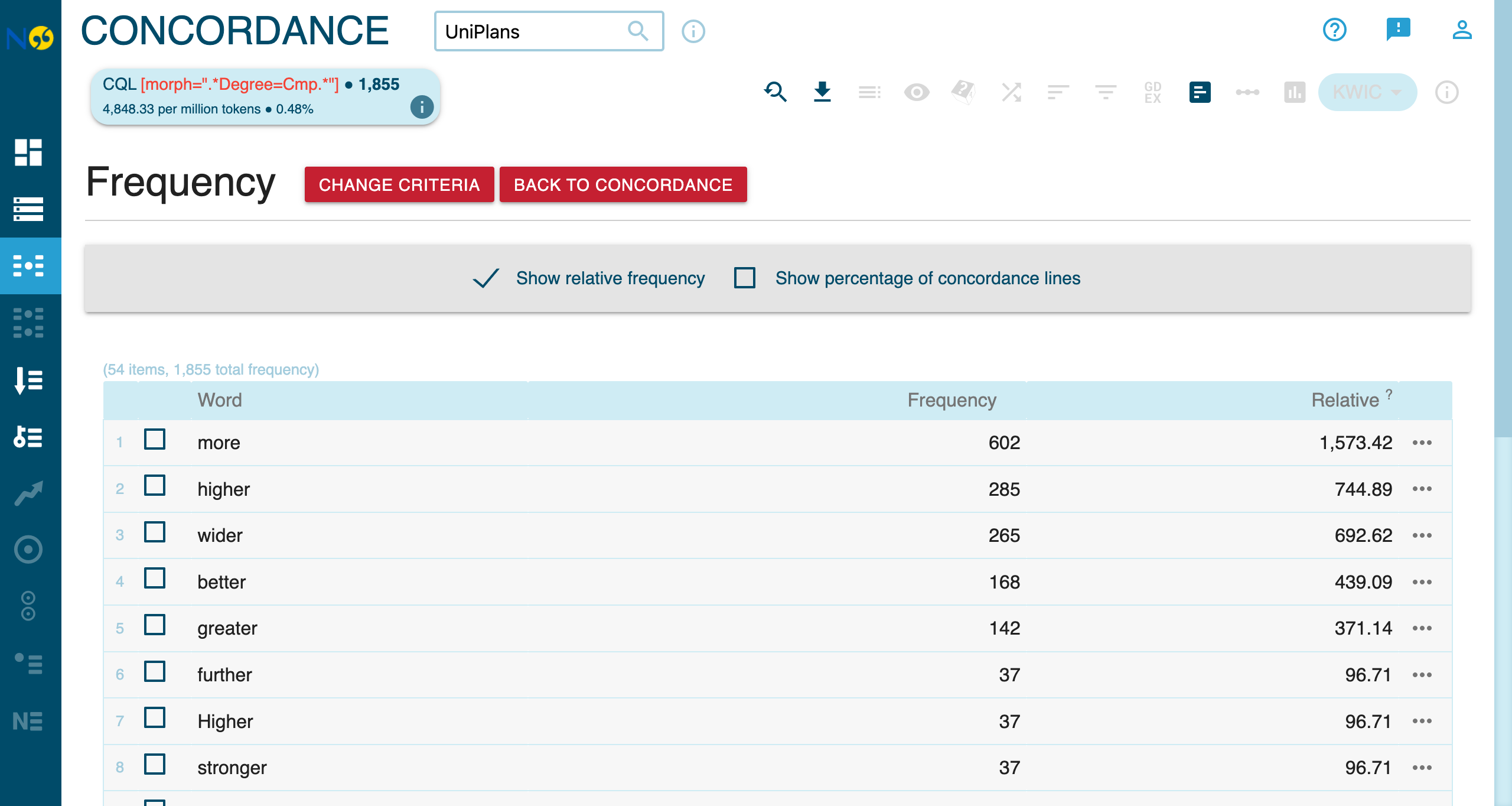
The high frequency of comparative forms—more (602), higher (285), wider (265), better (168), greater (142)—reveals how universities construct an implicit gap between present and desired future states. Beyond performance metrics (higher, greater), value-laden comparatives like fairer, healthier, greener, and safer indicate the ethical and social dimensions of institutional aspirations.
Named Entity Recognition (NER)
The corpus includes named entity annotations identifying organizations, places, dates, and more. See the spaCy model labels for details on entity types.
Available Entity Types
| Type | Description | Examples |
|---|---|---|
ORG |
Organizations | University of Edinburgh, NHS, REF |
GPE |
Geo-political entities | Scotland, London, UK |
DATE |
Dates and time | 2030, next decade |
CARDINAL |
Numbers | 50%, 10,000 |
MONEY |
Monetary values | £1 million |
PERCENT |
Percentages | 25% |
Finding All Organizations
This finds all mentions of organizations in the corpus.
Finding Geographic References
Finds country, city, and region names. Use the Frequency feature with the ent_type="GPE" query to see the most frequently mentioned places.
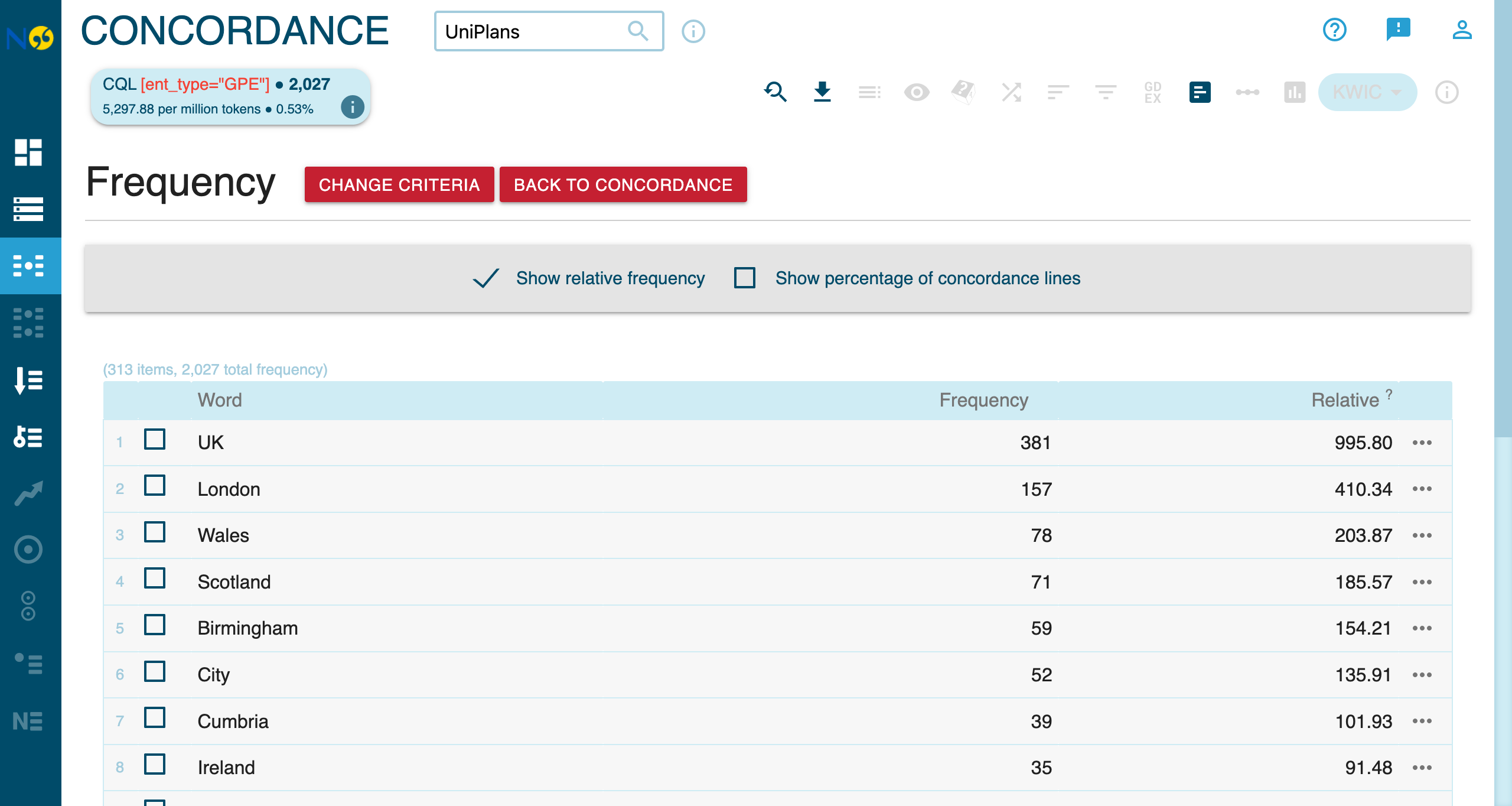
The frequency analysis reveals a strong domestic focus in UK university strategic plans. The top mentions are UK (381), London (157), Wales (78), and Scotland (71). International locations appear much lower: China (#23, 15 mentions), India (#25, 14), Dubai (#36, 12), and Singapore (#38, 12)—suggesting limited explicit international engagement in strategic planning discourse.
Combining NER with Other Attributes
Find when partnership is part of an organization name:
Find organization names containing specific words:
Use Cases for NER
- Identify key partners: Find which organizations are mentioned most frequently
- Geographic analysis: Compare international vs domestic references
- Temporal analysis: Identify target years and timelines in strategic plans
Collocations Analysis
NoSketch Engine provides a powerful Collocations feature that identifies words that co-occur with your search term more frequently than expected by chance.
Accessing Collocations
After running a query, click Collocations in the left sidebar to see statistically significant collocates.
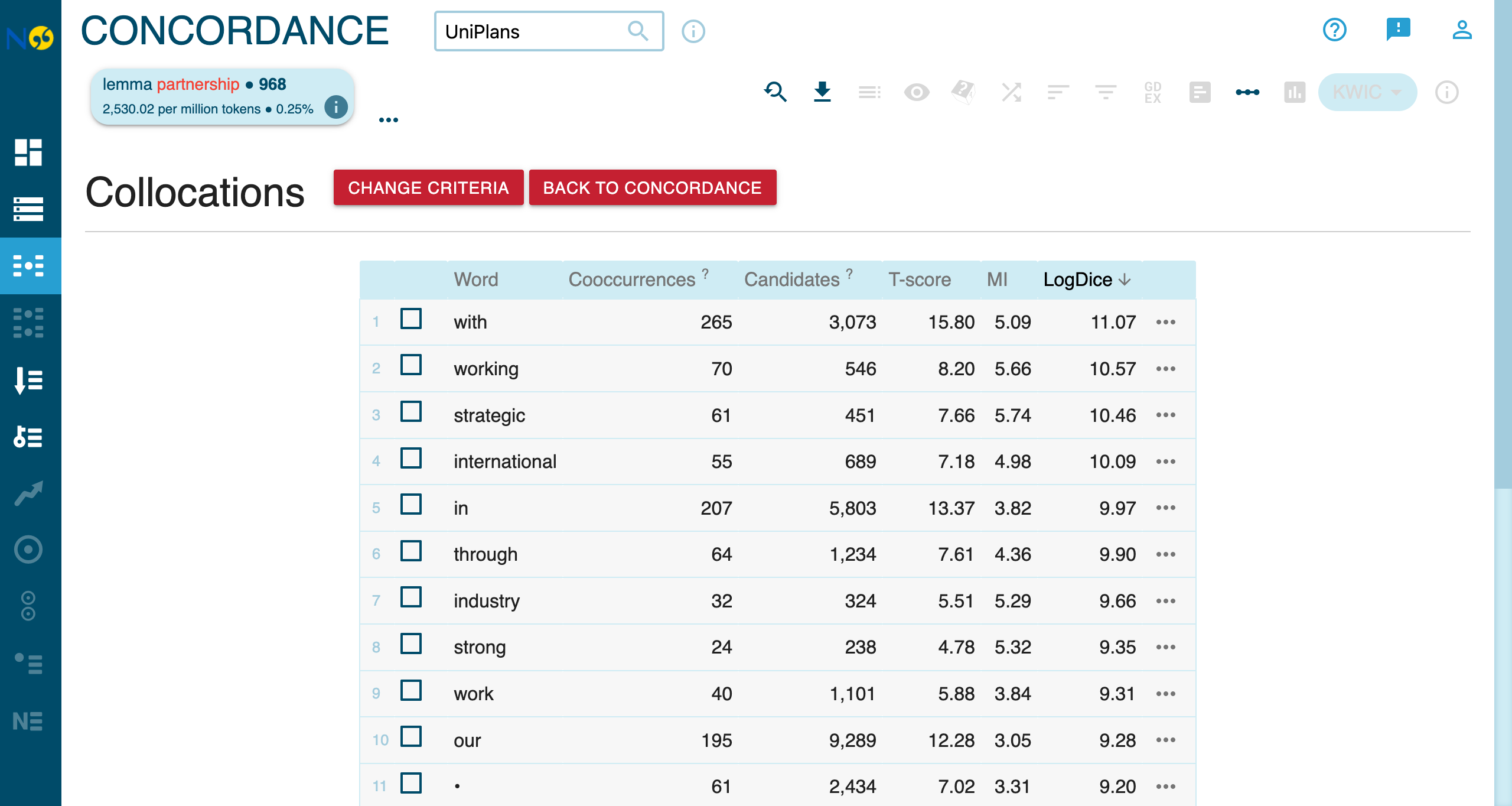
Top Collocates of partnership
The screenshot above shows the top collocates ranked by logDice score, which measures association strength (0-14 scale, higher = stronger). Scores above 7 indicate significant collocations.
Collocations vs Manual Proximity Queries
While proximity queries ([lemma="X"] []{0,N} [lemma="Y"]) let you search for specific combinations, the Collocations feature automatically discovers patterns you might not have anticipated.
Frequency Analysis
After running a query, use the Frequency panel to understand distributions across different dimensions.
Distribution by Word Form
The frequency breakdown shows how your query results distribute across word forms, POS tags, and other attributes:
Distribution by Metadata
Analyze how terms are distributed across document metadata:
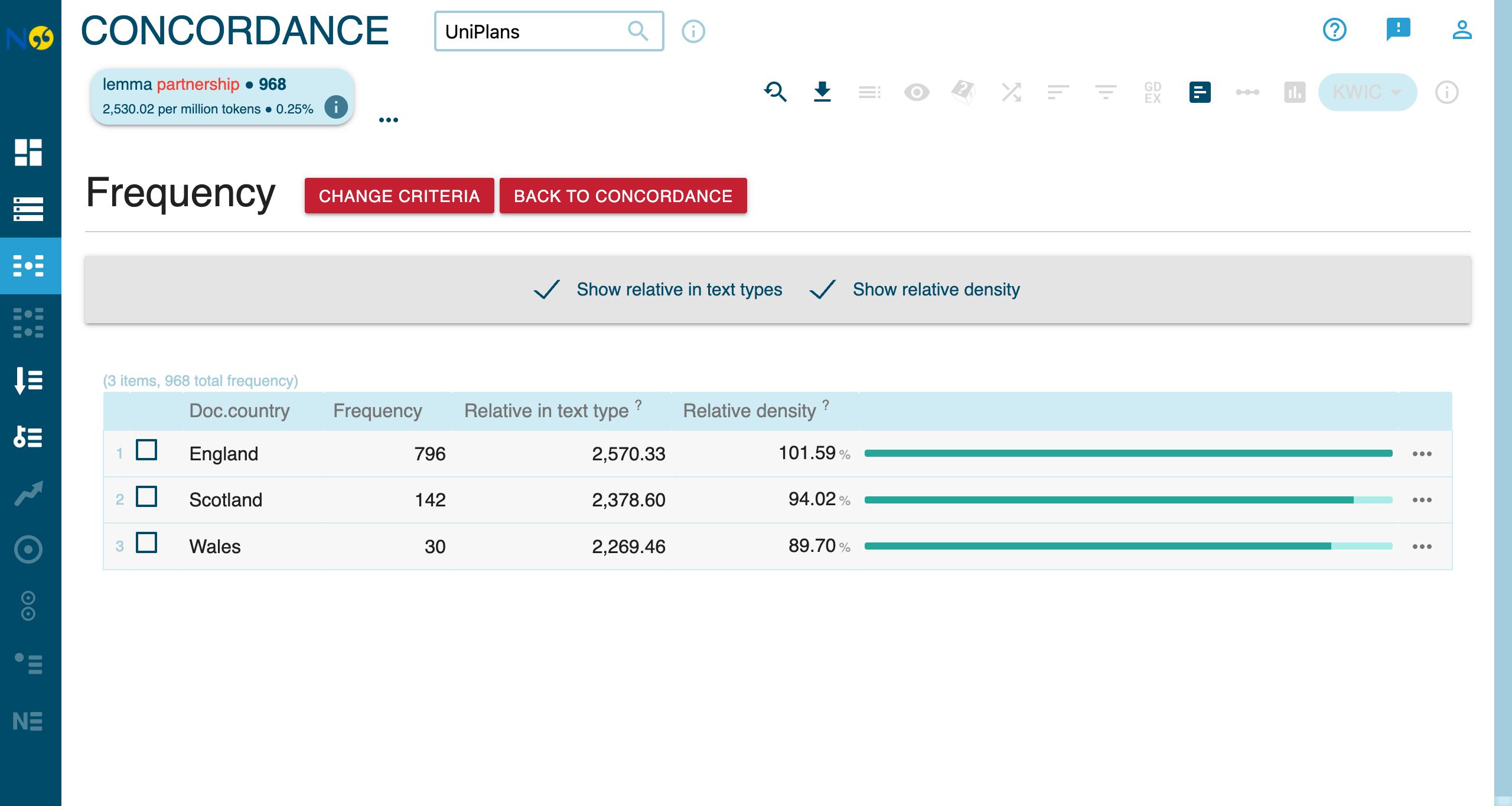
The distribution roughly corresponds to the number of universities in each nation.
Analyzing Distributions
- Countries: Compare usage in English vs Scottish vs Welsh universities
- Strategy years: See temporal patterns (2025 vs 2030 vs 2040 targets)
- Universities: Identify which institutions use certain terms most
Export Options
Export your results for further analysis:
- CSV: For spreadsheet analysis
- XLSX: For Excel with formatting
Filtering by Metadata
Use metadata filters to create subcorpora for focused analysis.
Filter by Country
Compare “partnership” usage across the UK nations:
- Select England to see only English universities
- Select Scotland to see only Scottish universities
- Select Wales to see only Welsh universities
Filter by Strategy Year
Analyze how discourse changes based on target dates:
- Universities targeting 2025 vs 2030 vs 2040
Semantic Analysis
Semantic analysis clusters concordance lines by semantic similarity, helping you discover usage patterns within a query.
For a full feature overview, see Semantic Analysis.
This walkthrough demonstrates semantic analysis using the UniPlans corpus of UK university strategic plans.
Step 1: Set up the query
- Select UniPlans (383K tokens) from the corpus dropdown.
- In the query builder, set:
- Attribute:
lemma - Operator:
== - Value:
partnership
- Attribute:
- Click Run builder query.
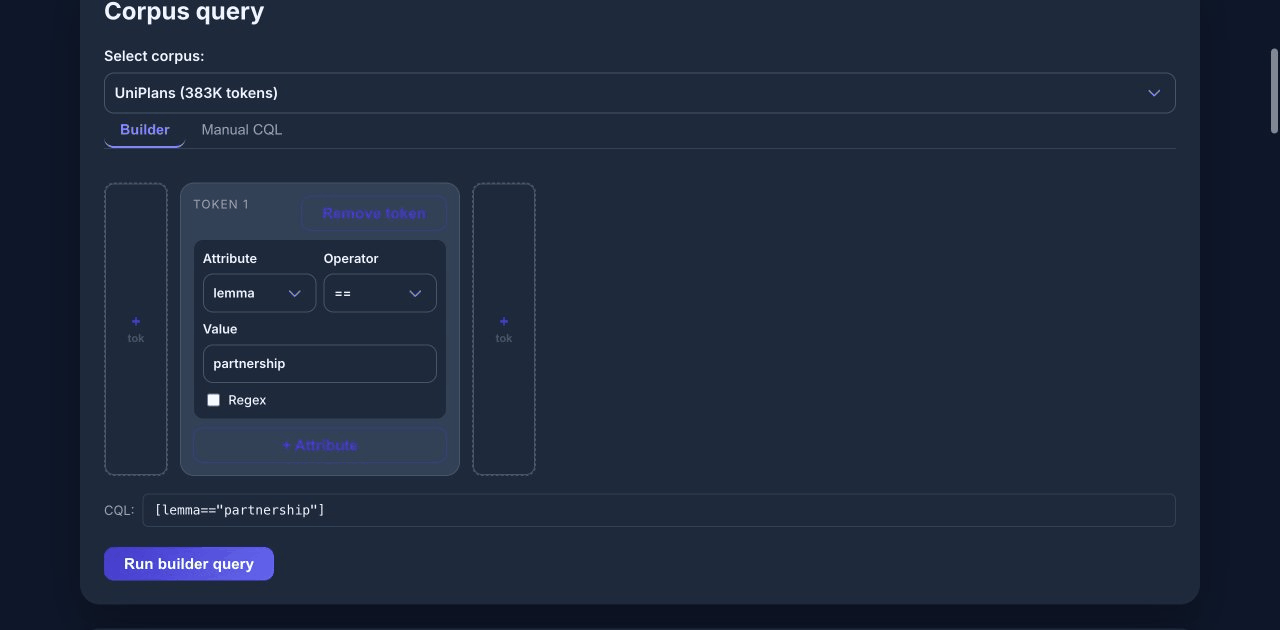
The query returns roughly 900 matches for forms of “partnership” across university strategic plans.
Step 2: Configure and run analysis
- Scroll to the Semantic analysis panel.
- Select sample size (e.g., 200 hits for a manageable analysis).
- Choose visualization method (t-SNE or UMAP).
- Click Analyze.
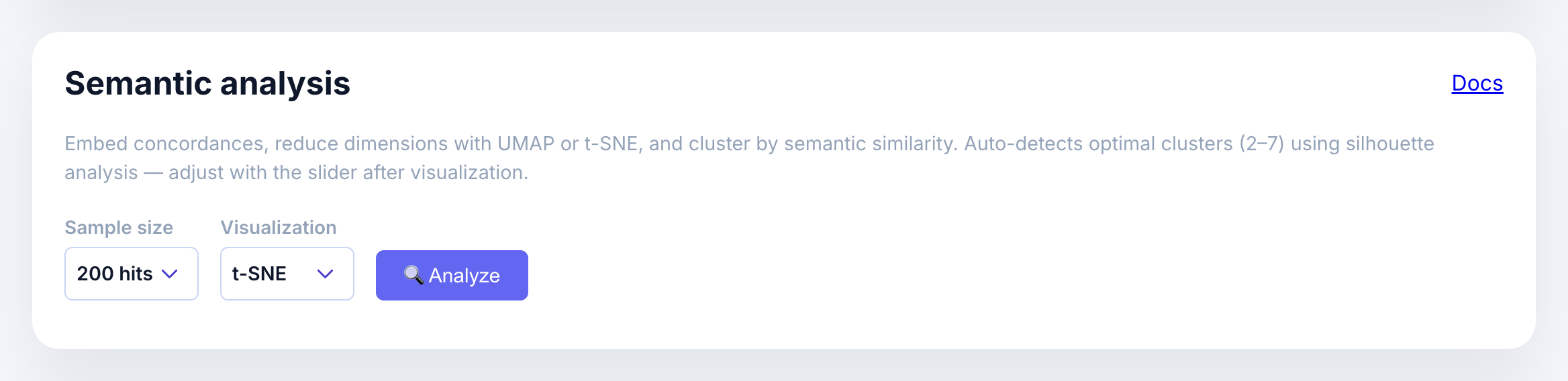
The analysis embeds each concordance line, reduces dimensions, and clusters automatically.
Step 3: Interpret the scatter plot
After analysis completes, you’ll see:
- A scatter plot where each point represents one concordance line
- Points colored by cluster assignment
- Cluster buttons showing the size of each cluster
- Silhouette score indicating cluster quality (higher = better separation)
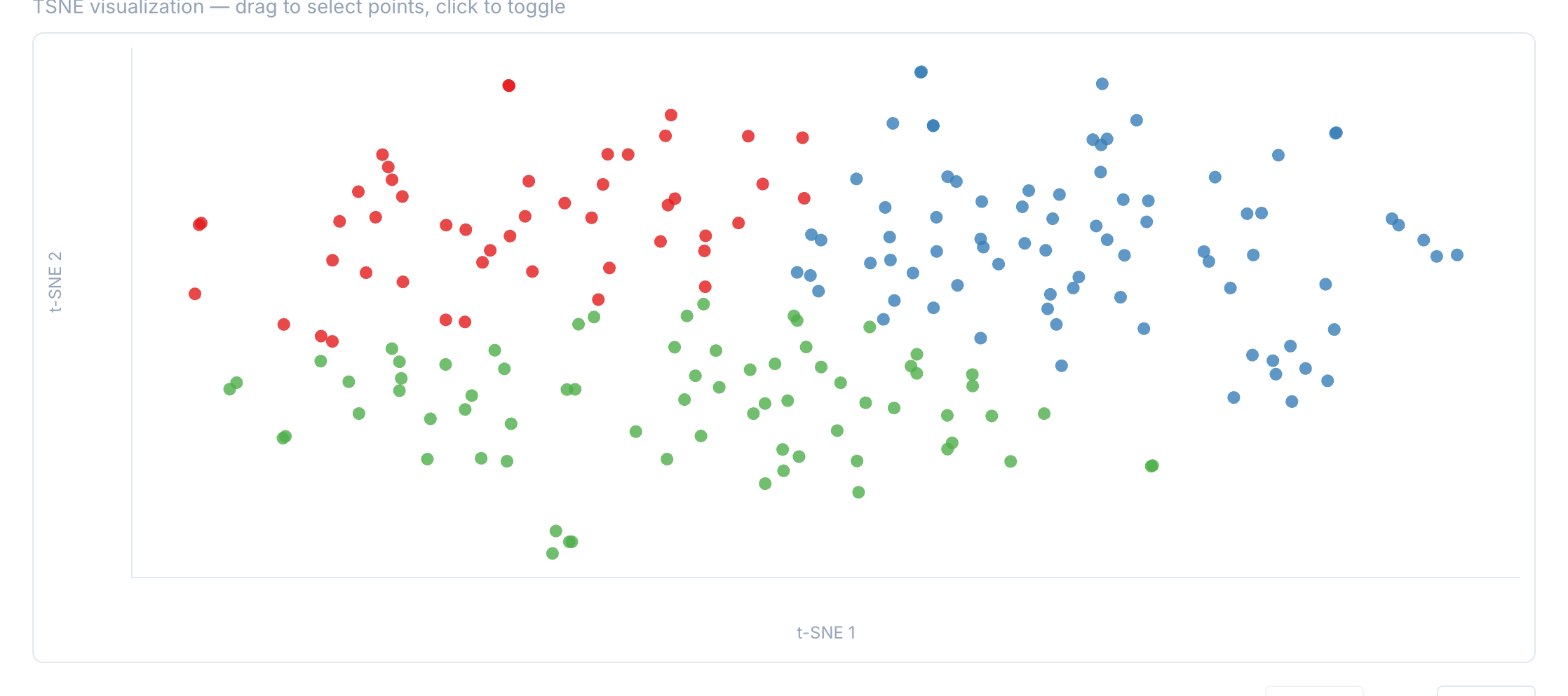
In this example, the analysis detected 3 clusters. The typical examples help interpret what distinguishes each cluster.
Step 4: Filter by cluster
Click a cluster button to filter the concordance table to only show lines from that cluster.
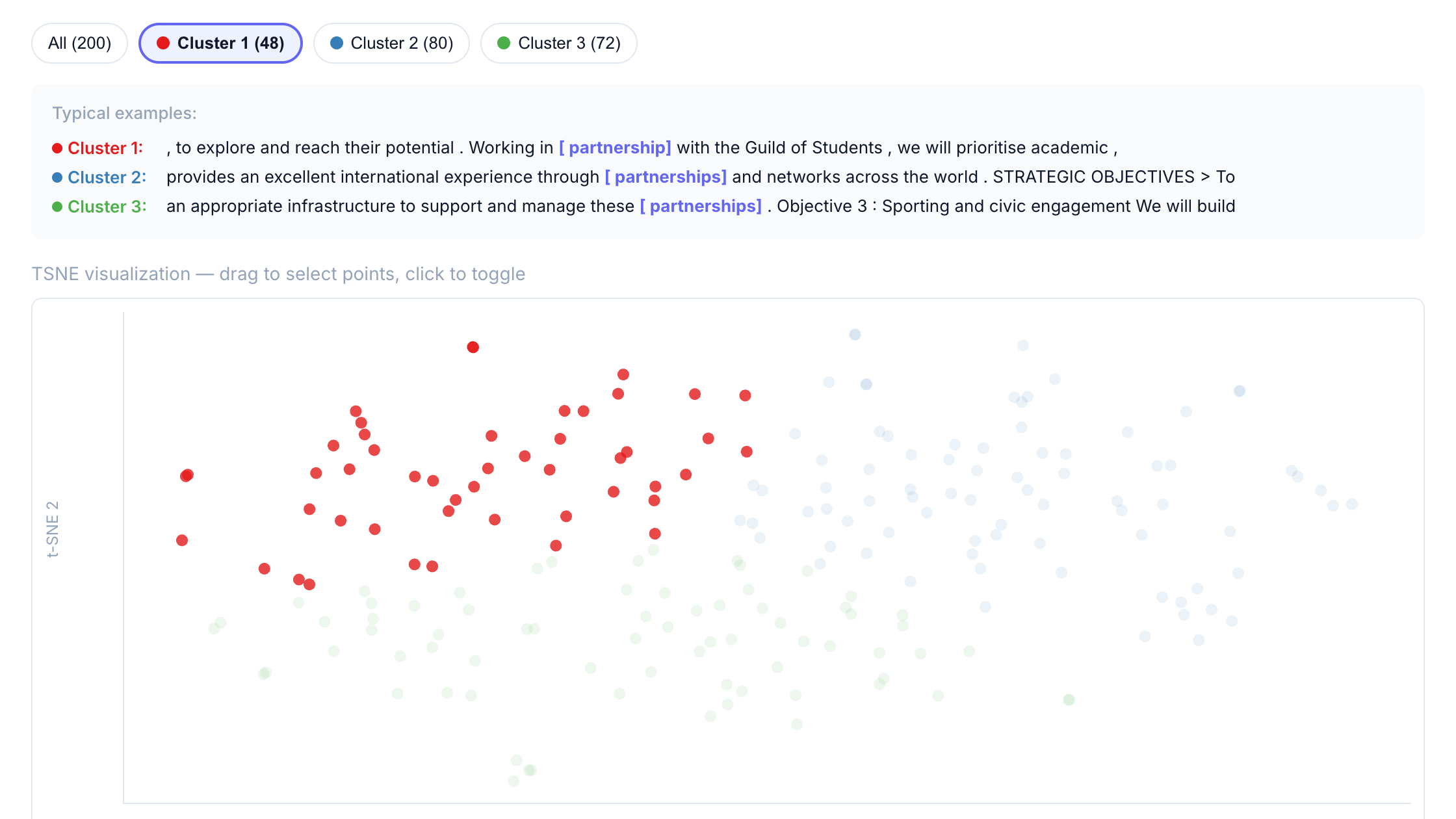
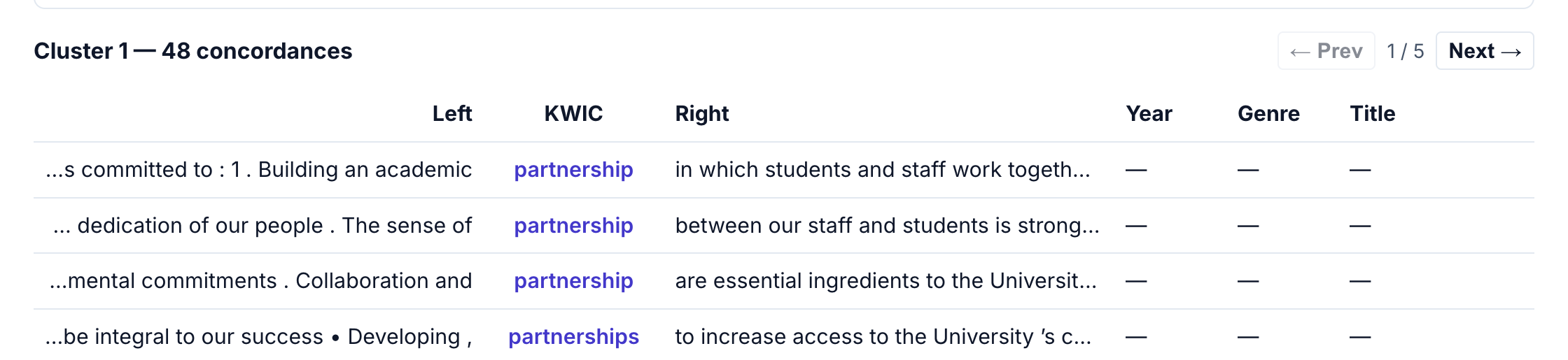
This makes it easy to:
- Read through examples from a specific semantic grouping
- Identify patterns in how “partnership” is used in different contexts
- Export filtered results for further analysis
Interpreting results
Semantic clusters represent usage similarity, not predefined categories. When interpreting:
- Look at the typical examples shown for each cluster
- Read several concordances from each cluster to understand the pattern
- Consider what linguistic or contextual features distinguish clusters
- Use the cluster slider to explore different numbers of clusters
For “partnership” in UniPlans, the clusters separate common usage patterns such as:
- Local/regional partnerships: community stakeholders, regional employers, local councils
- Global/international partnerships: worldwide networks, international collaborations, alumni connections
- Institutional partnerships: academic collaborations, internal initiatives, cross-campus programs
LLM Classification
LLM classification lets you label concordance samples with custom variables for targeted linguistic analysis.
For a full feature overview, see LLM Classification.
This walkthrough demonstrates LLM classification using the UniPlans corpus to analyze the grammatical subjects of “partnership” constructions.
Step 1: Run a query
First, run a CQL query to get concordance results:
- Select UniPlans (383K tokens) from the corpus dropdown.
- Query for
[lemma=="partnership"]. - Click Run builder query.
Step 2: Configure variables
Scroll to the LLM classification panel. You’ll see:
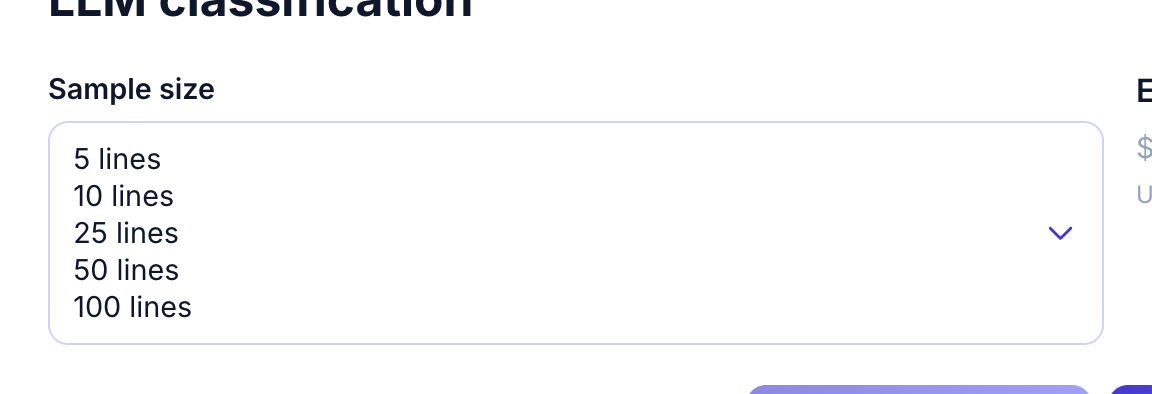
- Sample size: how many concordances to classify (5-100)
- Estimated cost: calculated based on variables and sample size
- Preset variable buttons: Subject animacy, Transitivity, Topic, Illocution
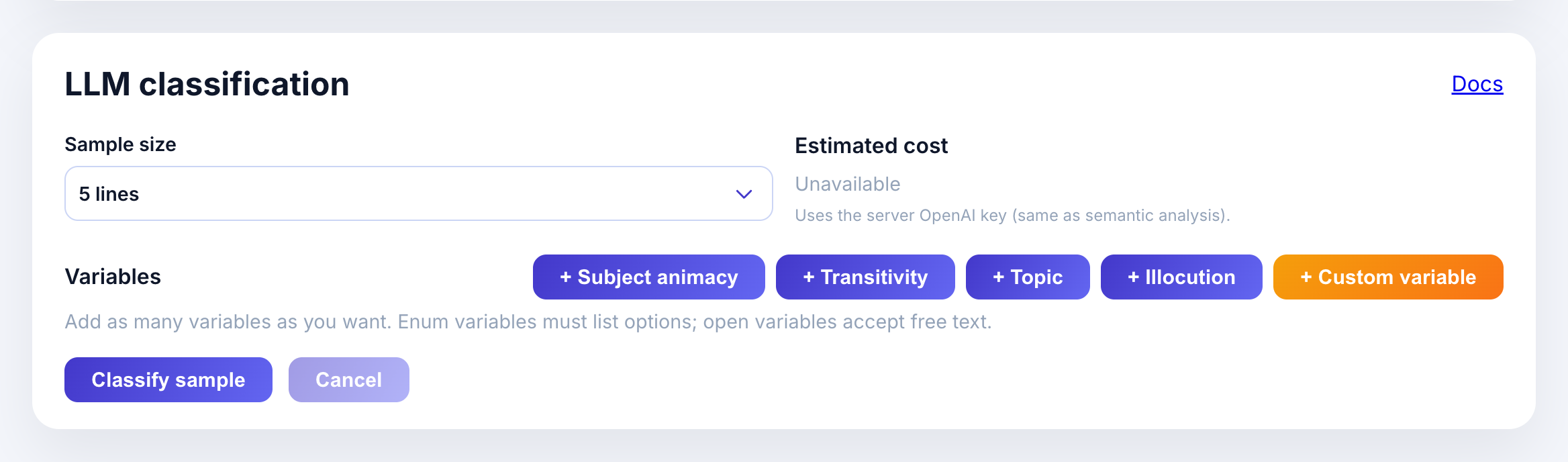
Open the sample size dropdown to pick how many lines to classify:
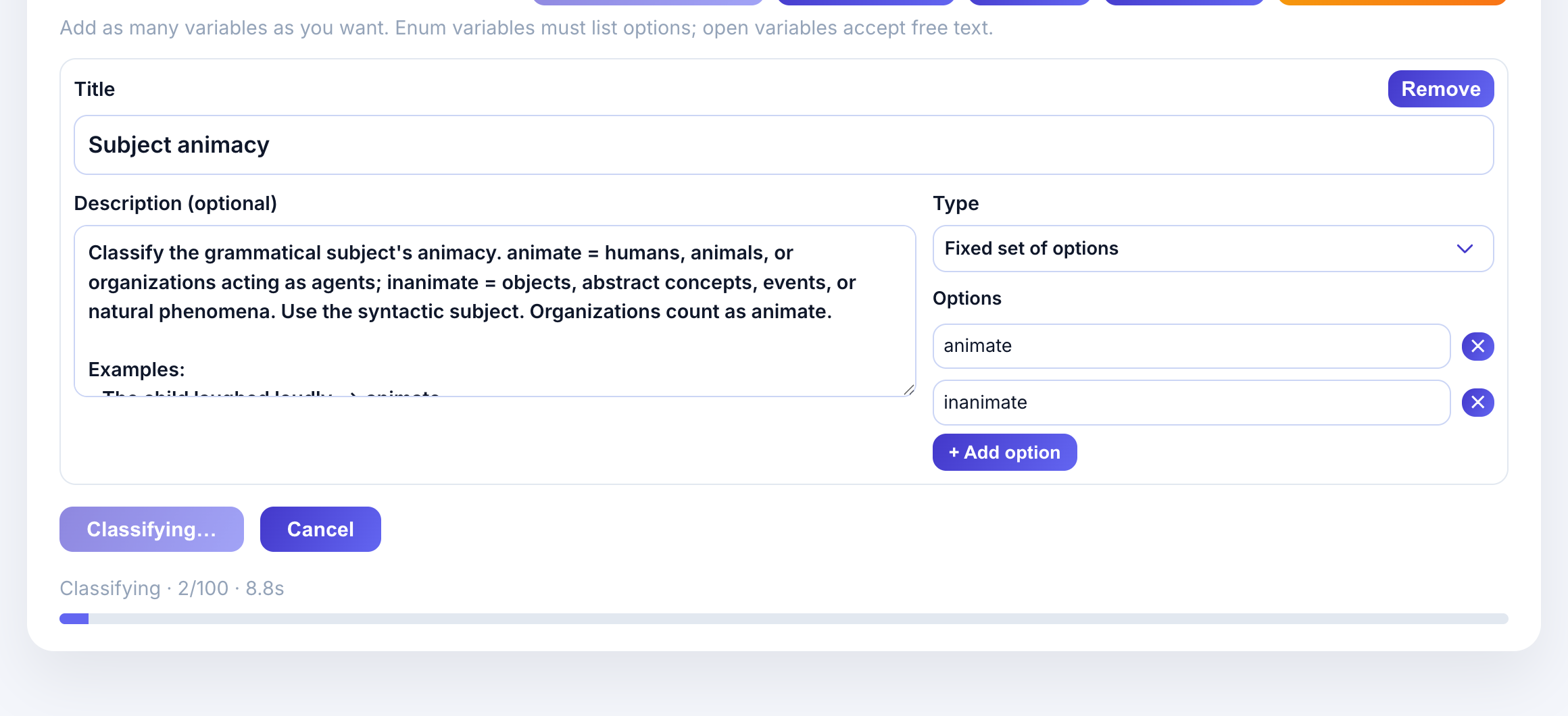
Click + Subject animacy to add the preset. The variable card appears with:
- Title: Subject animacy
- Description: Classification criteria with examples
- Type: Fixed set of options (enum)
- Options: animate, inanimate
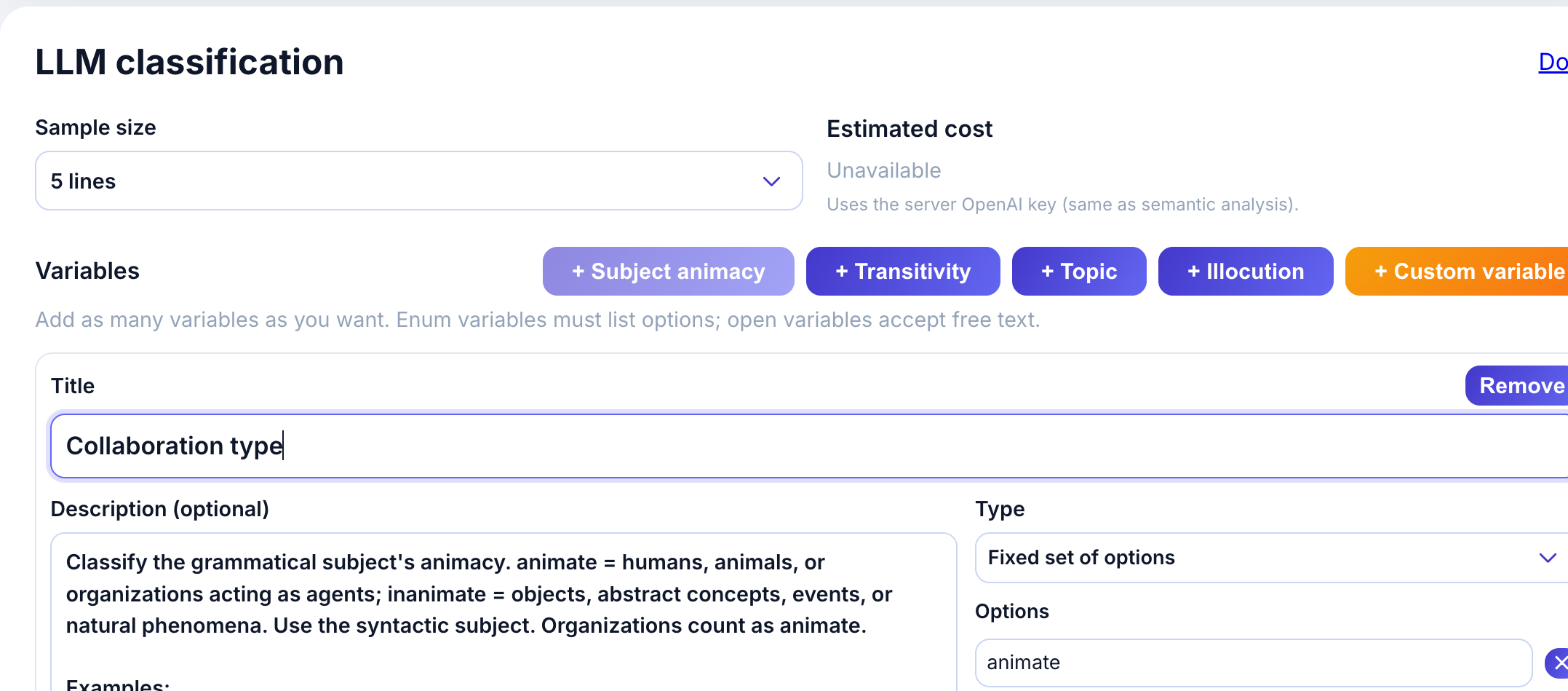
The description provides guidance to the LLM:
Classify the grammatical subject’s animacy. animate = humans, animals, or organizations acting as agents; inanimate = objects, abstract concepts, events, or natural phenomena.
Examples help calibrate the model:
- “The child laughed loudly.” -> animate
- “The committee approved the proposal.” -> animate
- “The storm destroyed the docks.” -> inanimate
Step 3: Run classification
- Select sample size (e.g., 5 lines for a quick test).
- Review the estimated cost.
- Click Classify sample.
The model classifies each concordance line and returns results.
Step 4: Review results
Results appear in a table with your variable columns:
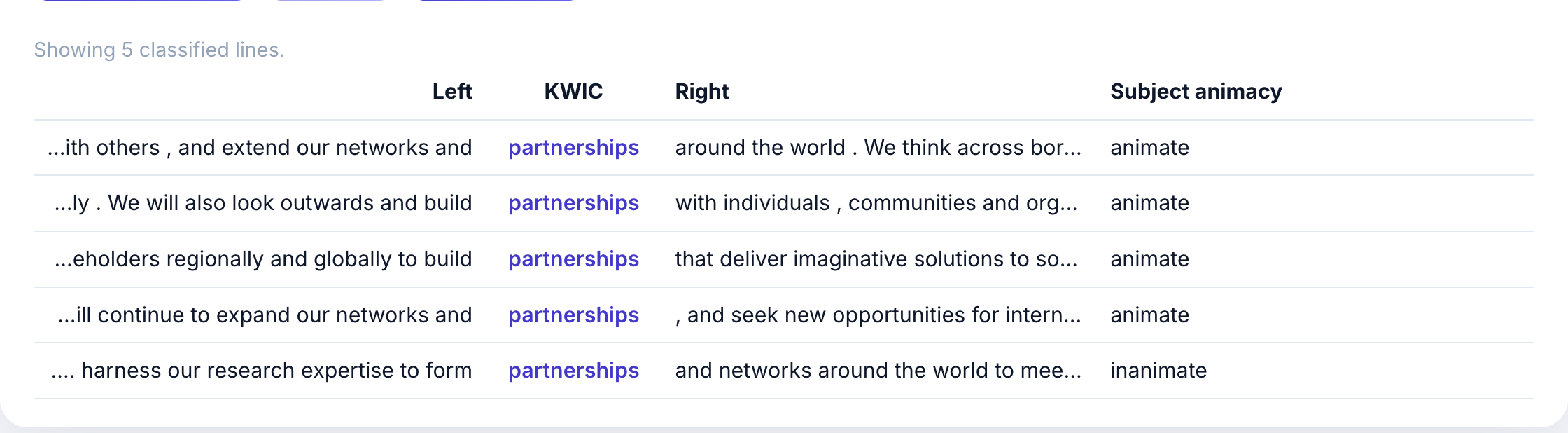
Each row shows:
- Left context: words before the keyword
- KWIC: the keyword in context (partnerships)
- Right context: words after the keyword
- Subject animacy: the LLM’s classification
In this example, most “partnership” usages have animate subjects (organizations, institutions, “we”) because the corpus discusses what universities do with partnerships.
Step 5: Export results
Click Export CSV to download results for further analysis in Excel, R, or Python.
Programmatic Access (API)
For advanced users, the corpus can be queried programmatically via the REST API.
API Endpoint
POST /cql/runExample Request (curl)
curl -X POST http://localhost:8000/cql/run \
  -H "Content-Type: application/json" \
  -d '{
    "cql": "[lemma=\"partnership\"]",
    "corpus_id": "uniplan",
    "limit": 50
  }'
Example Request (Python)
import requests

response = requests.post(
    "http://localhost:8000/cql/run",
    json={
        "cql": '[lemma="partnership"]',
        "corpus_id": "uniplan",
        "limit": 50
    }
)

results = response.json()
for hit in results["hits"]:
    print(hit["kwic"])
Response Format
{
  "total": 968,
  "hits": [
    {
      "text_id": 1,
      "position": 245,
      "left": "building international",
      "kwic": "partnerships",
      "right": "with other universities",
      "metadata": {
        "university_name": "University of Aberdeen",
        "country": "Scotland"
      }
    }
  ]
}
When to Use the API
- Batch processing: Analyze multiple queries programmatically
- Data pipelines: Integrate corpus data into research workflows
- Custom visualizations: Build specialized analysis tools
Quick Reference
Common Query Patterns
| Goal | CQL Query |
|---|---|
| Exact word | [word="partnership"] |
| All forms (lemma) | [lemma="partnership"] |
| Plural nouns only | [lemma="X" & pos="NNS"] |
| Adjacent words | [lemma="X"] [lemma="Y"] |
| Words within 3 | [lemma="X"] []{0,3} [lemma="Y"] |
| As direct object | [lemma="X" & deprel="dobj"] |
| As subject | [lemma="X" & deprel="nsubj"] |
| Organizations | [ent_type="ORG"] |
| Places | [ent_type="GPE"] |
| Plural forms | [lemma="X" & morph="Number=Plur"] |
| Regex match | [word="partner.*"] |
Dependency Relations
| Relation | Description |
|---|---|
| nsubj | Nominal subject |
| dobj | Direct object |
| pobj | Prepositional object |
| amod | Adjectival modifier |
| compound | Compound word |
| conj | Conjunction |